

e-invoicing, e-Invoicing Solution
9 Reasons E-Invoicing Projects Fail (and How to Spot Them Early)
27 JULY 2026 • 7 Min read

It’s never the tech. It’s always one of these nine. Probably three of them, at once.
Across KSA, India, Malaysia, and the early UAE pre-mandate work, we’ve seen enough e-invoicing rollouts succeed and fail to notice a pattern. Technical issues rarely cause e-invoicing projects to fail. The integrations rarely fail. The vendors usually do their job.
Instead, projects collapse due to poor planning, messy data, unclear ownership, and bad timing. It is always the same handful of problems, no matter the country.
This field guide breaks down each failure mode. For every risk, you will find what it looks like, how to spot the early warning signs, and exactly how to fix it.
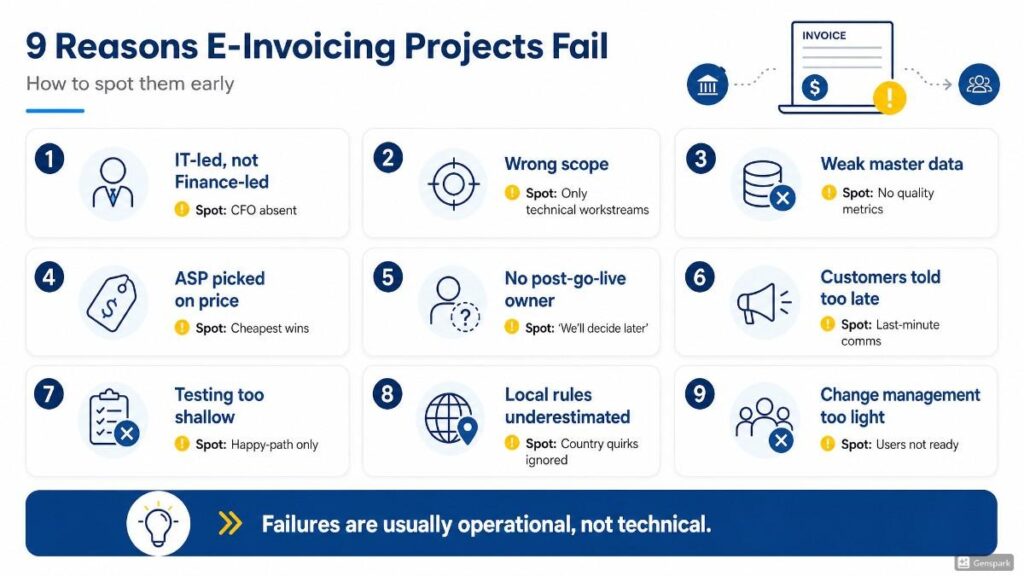
Failure 1: The project is owned by IT, not by Finance
What it looks like: The CIO is in every meeting. The CFO is in none. Conversations are about middleware, integration, and APIs. Conversations are not about process, master data, or AP/AR redesign.
Early warning sign: When you ask “Who owns the AP workflow to redesign?”, there’s a 4-second pause before someone says “we’ll get to that.”
Fix: CFO chairs the steering committee. Personally. For at least 90 days. IT delivers; Finance owns.
Failure 2: Scope was defined as “the e-invoicing project” instead of “the finance operating model change”
What it looks like: The project plan has 12 workstreams, all of which are technical. Master data is one line item. AP workflow redesign is missing. Training is a one-week tag at the end.
Early warning sign: Your project plan fits on one page and every box is green.
Fix: Shift your focus from checklists to results. Instead of tracking “integration finished,” track “clean data flowing correctly.” This approach forces you to fix the real-world, non-technical problems.
Failure 3: Master data was assumed to be “good enough”
What it looks like: Six weeks before go-live, someone finally runs a master data quality report. The report shows 18% of customer records have invalid or missing TRNs. The team underestimates how much rework it requires.
Early warning sign: No one on the project team can quote, without hesitation, the count of customers, the count of suppliers, and the count of records flagged as duplicates.
Fix: Run the master data audit in Week 2 of the project, not Week 22. Triage and remediate before go-live. The 30-day checklist puts it on Day 13; that’s on purpose.
Failure 4: The ASP was chosen on price.
You buy the cheapest system on the market. By month nine, the integration is breaking down, customer service ignores your calls, and someone in Finance is quietly running the whole process on an Excel sheet that shouldn’t even exist.
Early warning sign: When you ask “why did we pick this ASP?”, the answer is “they came in 30% under the next bidder.”
Fix: Questions to Ask Before You Pick an ASP applied during procurement, not retroactively. If you’re already past selection and worried, run the 12-question audit against your current ASP and flag the reds.
Failure 5: No one owns the post-go-live operations.
What it looks like: Go-live is a celebration. The project team scatters. Week 4 post-go-live, rejection rates are climbing, exceptions are stacking up in a queue with no owner, and Finance has reverted to manual workarounds.
Early warning sign: When you ask “Who is the post-go-live owner?”, the answer is “we’ll figure that out closer to the time”.
Fix: Name the post-go-live owner before go-live. Budget for a 90-day war room. Weekly scorecard. Then, formal BAU handover.
Failure 6: Customers were told too late.
What it looks like: Go-live happens. Customer AP teams start receiving invoices in a new format. They don’t know what to do with them. They call your AR team. Your AR team gets buried for three weeks.
Early warning sign: Your customer communication plan is “we’ll send a note out closer to go-live”.
Fix: 60/30/7-day sequence. 60-day heads-up. 30-day specifics with format samples. 7-day reminder with FAQ. Day-1 confirmation.
Failure 7: The AP-side process was never redesigned.
What it looks like:
- AR is compliant
- AP is in chaos
- Suppliers are using six different ASPs
- sending invoices in inconsistent timing patterns
With corrections coming through unpredictable channels. The AP team is doing reconciliation manually because no one designed the new inbound process.
Early warning sign: The project plan has 11 AR-side workstreams and 1 AP-side workstream.
Fix:
- AP is at least 40% of the project
- Treat it as such
- Map your top 50 suppliers
- Design exception-handling rules
- Set up the reconciliation tooling
- Train AP staff
Failure 8: Training was treated as the last item on the project plan.
What it looks like: Two weeks before go-live, the training calendar gets emailed out. AP and AR staff are asked to attend a 90-minute session. They show up, take notes, and forget half of it by go-live week.
Early warning sign: The training workstream has no named owner and no budget line.
Fix: Training is a 6-week programme, not a 90-minute session. Function-specific modules. Hands-on labs. Reference cards. Named the training owner from Day 1 of the project.
H2: Failure 9: The CFO disengaged after week 6.
What it looks like: The CFO attended the first three steering committees. Then “got pulled into quarter-end”. Then “would skip the next one too because the team’s doing fine”. By month 4, the project has drifted three weeks behind schedule, and no one wants to be the one to flag it.
Early warning sign: The CFO’s diary has e-invoicing meetings marked as “tentative”.
Fix: Block CFO time as fixed, not tentative, for the first 90 days. Then quarterly thereafter. Disengagement at the top travels downward faster than any other signal.
A 12-minute self-diagnostic
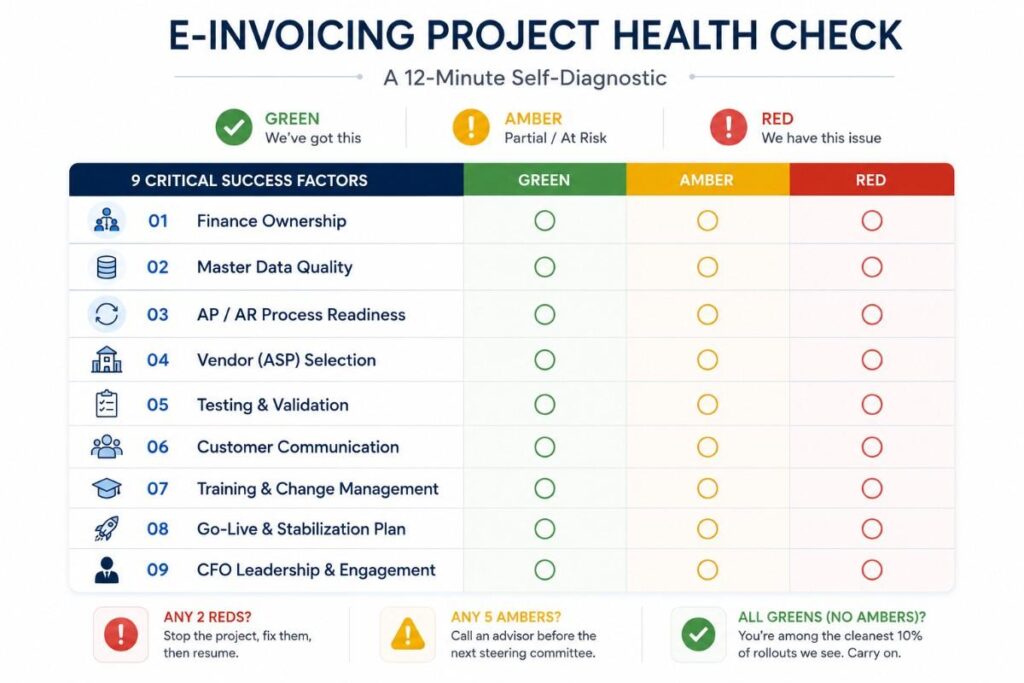
Walk through each of the nine. For each one, rate honestly: Green (we’ve got this), Amber (partial, at risk), Red (we have this failure mode now). No averages. No, “let’s aim for 7 out of 9”. The rule:
- Any 2 Reds: stop the project, fix them, then resume.
- Any 5 Ambers: call an advisor before the next steering committee.
- All Greens with no Ambers: you’re among the cleanest 10% of rollouts we see. Quietly carry on.
The Ninth Reason Is the One Nobody Talks About Until It’s Too Late
Every failed e-invoicing rollout has a paper trail of warning signs that got ignored, brushed off, or simply missed because nobody was looking in the right place at the right time. Maybe it’s a tax position that was never quite airtight, or a compliance gap sitting quietly in a process nobody’s audited in years, or a system integration that looked fine in testing and fell apart at go-live.
Whatever the cause, the pattern is always the same: the failure was preventable, and someone knew it was coming. If any of these nine reasons sound uncomfortably familiar, don’t wait for a missed deadline to confirm it.
Our tax advisory services team can pressure-test your current tax position before it becomes a liability, while our dedicated e-Invoicing advisory specialists work directly with your finance team to close integration gaps, validate formats, and keep phased rollout timelines realistic instead of aspirational.
And since e-invoicing rarely fails in isolation, our regulatory compliance advisory experts help you see the compliance risks sitting just outside this article’s scope. The businesses that avoid becoming reason number ten are the ones that ask for a second opinion before the warning signs turn into a postmortem. Talk to KPI while there’s still time to course-correct.



Stay Ahead of the Curve
Subscribe for Expert Audit and Financial Insights Directly to Your Inbox.