

e-invoicing, e-Invoicing Solution, Finance
Redesigning AP and AR for E-Invoicing: The Workflows That Quietly Break
17 SEPTEMBER 2026 • 5 Min read
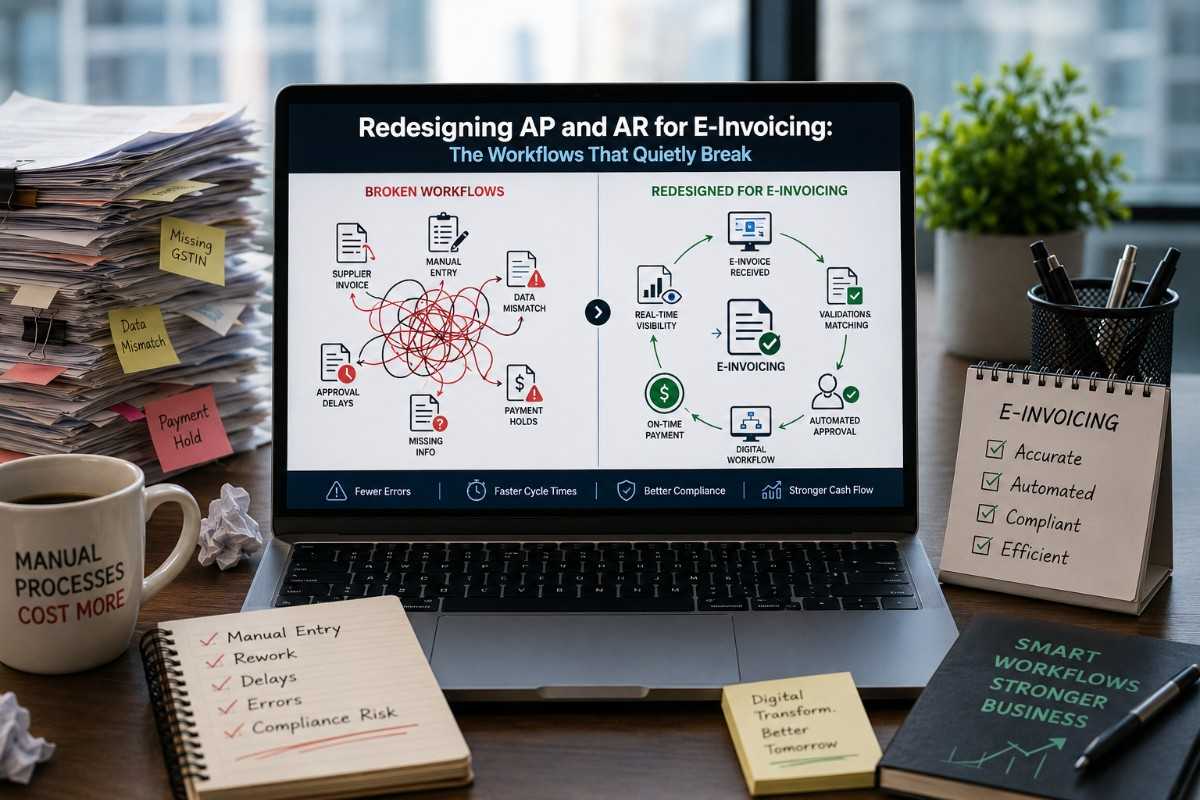
The technology gets the attention. The workflows get the pain. Here’s where AP and AR actually need to change and the practical sequence to do it without losing your team.
Most UAE finance teams approach e-invoicing as a technology project. ASP selected. ERP integrated. Master data audited. PINT AE configured. The technology runs. Job done.
Then, week three of production happens.
An AP team that’s been handling supplier invoices the same way for nine years suddenly receives 80% of its invoices through a new structured channel. The other 20% arrive the old way, because some suppliers aren’t ready yet. The AR team is fielding customer queries about invoice formats they’ve never seen before. The exceptions queue is growing faster than the resolution rhythm. People are working around the system rather than through it.
None of this is the technology’s fault. It’s the workflow’s fault that workflows were designed for a pre-e-invoicing world and weren’t redesigned in time. Below, we cover where the friction actually sits, and how to redesign without breaking morale.
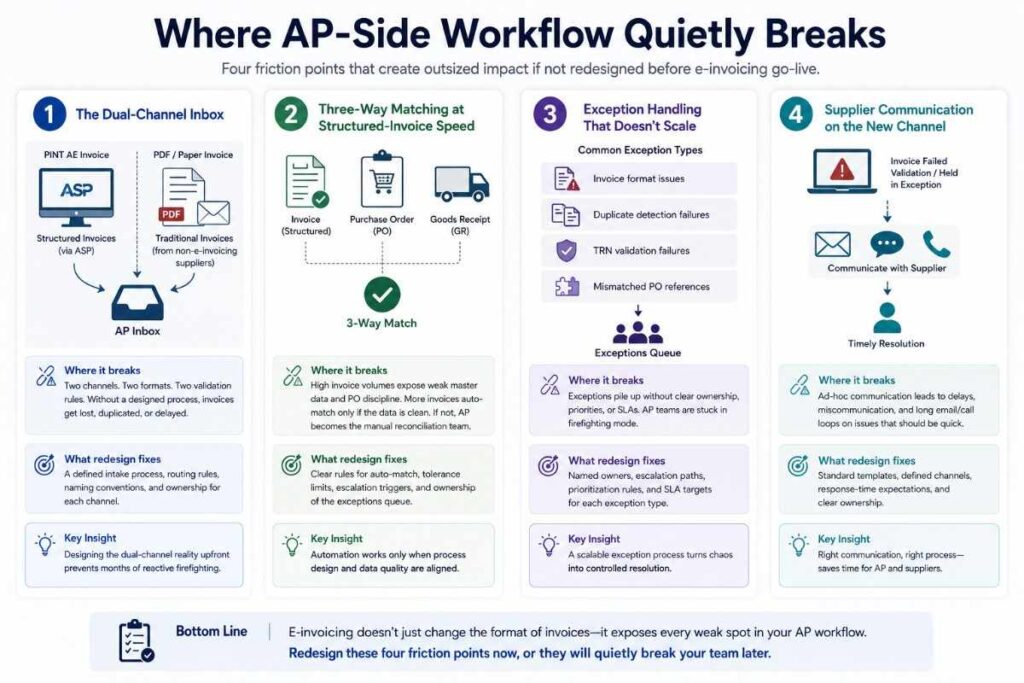
Part 1: Where AP-side workflow quietly breaks
Friction 1- The dual-channel inbox
In month one post-go-live, your AP team receives invoices through two channels: structured PINT AE invoices through the ASP, and traditional PDFs/paper from suppliers not yet live on e-invoicing. The AP workflow must handle both, often for 12–18 months until your supplier ecosystem catches up. Designing this dual-channel reality into the workflow before go-live prevents the chaos of trying to handle both reactively.
Friction 2- Three-way matching at structured-invoice speed
Structured invoices arrive faster, more often, in a more standardized form. The matching against POs and goods receipts becomes more automated IF the master data and PO discipline are clean. If they’re not, the AP team becomes the reconciliation team, manually matching what the system can’t match cleanly. Redesigning the three-way matching process when to auto-match, when to escalate, and who owns the exceptions queue is foundational.
Friction 3- Exception handling that doesn’t scale
In a 30-supplier business, exceptions can be handled informally. In a 500-supplier business with daily volume, informal handling collapses. The exception types under e-invoicing – invoice format issues, duplicate detection failures, TRN validation failures, and mismatched PO references need named owners, escalation paths, and SLAs. Without these, exceptions stack up, and the AP team works through them in firefighting mode.
Friction 4- Supplier communication on the new channel
When a supplier’s invoice fails validation or is held in exception, the AP team needs to communicate with the supplier. The right communication channel, message templates, and response-time expectations all need defining. AP teams that improvise this end up in 30-minute calls about invoice format issues that should take 2 minutes.
Part 2: Where AR-side workflow quietly breaks
Friction 5- Customer queries on invoice format
Your customers’ AP teams will see structured invoices from you for the first time. They may have questions about format, about specific fields, about how to find references they used to see in the PDF version. Your AR team becomes the customer-support function for this. Prepared FAQs, response scripts, and named contacts prevent your AR team from drowning in five-minute clarification emails.
Friction 6- Credit notes, corrections, and disputes
Disputes existed before e-invoicing. Now they happen through structured credit notes with audit-trail linkage. The AR workflow for issuing corrections, tracking dispute resolution, and closing audit chains needs to be operationally clean, not “we’ll figure it out per case.”
Friction 7- Cash-application against structured invoices
When customers pay, your AR team applies cash to invoices. With structured invoices flowing in a more standardized format, the cash application can be more automated. But the matching logic needs to be set up correctly; payment references, customer remittance practices, partial payments, and payments on consolidated invoices all need workflow design.
Friction 8- Customer-account aggregation discipline
For B2B AR with corporate-account billing, structured invoices may consolidate or split differently from the previous PDF model. Customer expectation management, confirming with each major customer what their AP team prefers, prevents week-3 surprise disputes.
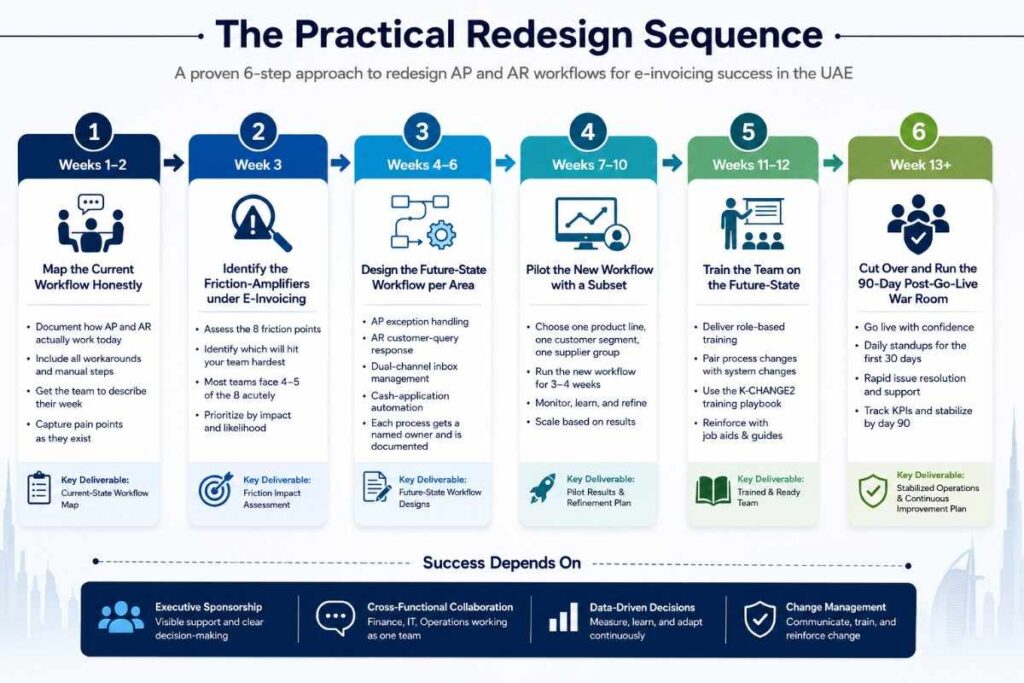
Part 3: The practical redesign sequence
This is the sequence we walk through with every UAE finance team facing e-invoicing redesign:
- Weeks 1-2: Map the current workflow honestly. Pre-e-invoicing: what actually happens in AP and AR, including the workarounds nobody documents. Get the team to describe their week.
- Week 3: Identify the friction amplifiers under e-invoicing. Which of the eight friction points above will hit your team hardest? Most groups face 4-5 of the 8 acutely.
- Weeks 4-6: Design the future-state workflow per area. AP exception handling. AR customer-query response. Dual-channel inbox management. Cash-application automation. Each gets a named owner and a documented process.
- Weeks 7-10: Pilot the new workflow with a subset: one product line, one customer segment, one supplier group. Run it for 3-4 weeks, refine, then scale.
- Weeks 11-12: Train the team on the future state. Process changes paired with system changes (see K-CHANGE2: the training playbook).
- Week 13+: Cut over and run the 90-day post-go-live war room with daily standups for the first 30 days.
Part 4: What good looks like at month three post go-live
- Less than 1% of invoices in exception (down from the typical 5-10% in week 1)
- Three-way matching auto-rate above 80% (up from manual-first state)
- Customer queries on invoice format are typically resolved in under 4 hours
- AP team works through the exception queue daily, not living in firefighting mode
- Cash application auto-rate above 70% for B2B AR
- AR and AP teams describe the new workflow as easier than the old one, not harder
The last bullet is the test. If your team is still describing the new workflow as harder than the old one in month three, the redesign wasn’t complete; it just moved the friction.
Your E-Invoicing System Works. Does Your Workflow?
Getting PINT AE live is a milestone, not a finish line. The teams that struggle three months post-go-live usually aren’t fighting the technology; they’re fighting a workflow nobody redesigned. KPI’s tax advisory team in the UAE has guided finance departments across exception handling, dual-channel AP inboxes, and cash-application automation, the parts of e-invoicing that never make the implementation slide deck.
If your rollout is already live and the exception queue keeps growing, our e-invoicing advisory specialists can map your specific friction points and build a redesign sequence your team can actually follow. And if workflow gaps are starting to create reconciliation or reporting risk, our audit and assurance services can help you catch it before it reaches your books.
Not sure where your AP and AR workflows currently stand? Talk to KPI and get a friction assessment before your next invoicing cycle.



Stay Ahead of the Curve
Subscribe for Expert Audit and Financial Insights Directly to Your Inbox.